

When working on wireframes, clear communication is just as important as clean layout design. Many teams rely on Balsamiq to quickly sketch ideas, test concepts, and align stakeholders before moving into development. One common question that arises during collaboration is whether comments can be added to Balsamiq wireframes and how effective those comments are in real-world workflows.
TLDR: Yes, comments can be added in Balsamiq Wireframes, and they are an essential part of collaborative design. Users can insert notes directly into projects, use built-in comment panels, and rely on annotations to clarify intent. These tools help teams gather feedback, document decisions, and improve communication without cluttering the design itself. Understanding how comments work can significantly enhance teamwork and project efficiency.
Understanding Comments in Balsamiq Wireframes
Balsamiq is known for its low-fidelity, sketch-style interface that keeps designers focused on structure rather than visual polish. While the tool emphasizes simplicity, it also provides practical methods for feedback and documentation.
Comments in Balsamiq generally fall into two categories:
- Project-based comments – Used for collaboration and feedback directly within the wireframe file.
- Design annotations – Visual notes embedded inside the wireframe itself.
Both methods serve different purposes, and understanding when to use each one makes collaboration smoother and more effective.
How to Add Comments in Balsamiq
In Balsamiq Cloud and other collaborative environments, users can attach comments directly to wireframes. This feature is particularly useful when multiple team members review a design simultaneously.
Image not found in postmeta
Using the Built-In Comment Panel
To add a comment in Balsamiq:
- Open the wireframe project.
- Locate the Comments icon or panel (usually positioned in the top toolbar or side panel).
- Click on a specific area of the wireframe to anchor the comment.
- Type your message and post it.
This creates a threaded discussion tied to a particular part of the design. Teammates can reply, resolve comments, and keep communication centralized within the project.
This approach prevents lengthy email chains and scattered feedback across multiple channels.
Adding Annotations Directly to Wireframes
Beyond formal comments, Balsamiq also allows designers to include visible annotations within their wireframes. These annotations are especially useful when sharing static exports (like PDFs or PNG files), where the comment panel may not be accessible.
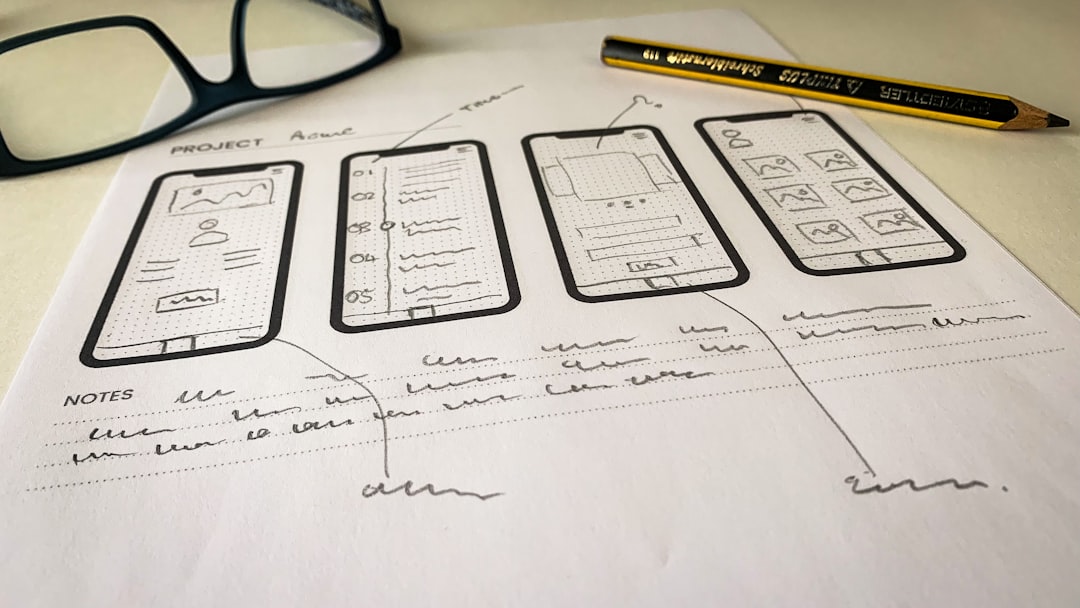
Common Annotation Techniques
- Sticky note elements from the UI library
- Callout boxes describing functionality
- Text labels explaining user flows
- Numbered markers referencing detailed documentation
These elements act as visible documentation embedded directly in the design. They help developers, stakeholders, and product managers understand design decisions without requiring extra explanation.
However, designers should be careful not to overcrowd the layout. Since wireframes are meant to clarify structure, too many annotations can introduce confusion.
Why Comments Are Important in Wireframing
Wireframes represent the foundation of a product’s user experience. At this stage, ideas are fluid and changes are relatively inexpensive. Feedback plays a critical role in refining these early concepts.
Adding comments helps teams:
- Clarify intentions behind UI components
- Capture stakeholder feedback in context
- Document design decisions for future reference
- Reduce misinterpretations before moving into high-fidelity design
Without comments, team members may misinterpret a checkbox, a navigation structure, or a placeholder element. A simple note explaining functionality can prevent costly redesign work later.
Collaborative Workflows with Comments
Modern product teams often operate across different time zones and departments. Commenting features enable asynchronous collaboration, meaning participants do not need to be present at the same time to contribute.

For example, a designer can upload a wireframe in the afternoon, a product manager can leave feedback overnight, and a developer can respond the next morning. Each interaction is tracked within the project.
Best Practices for Collaborative Commenting
- Be specific: Reference the exact element or component.
- Ask actionable questions: Instead of saying “This feels off,” suggest alternatives.
- Resolve completed discussions: Mark comments as resolved once addressed.
- Keep tone constructive: Focus on usability, not personal preference.
Using structured and respectful feedback ensures comments serve as improvement tools rather than sources of confusion.
Limitations of Comments in Balsamiq
While Balsamiq supports commenting, it is not a full project management system. Users should understand its practical scope.
Some limitations include:
- No advanced task tracking within comments
- Limited formatting options inside comment threads
- Dependency on platform version (Cloud vs Desktop)
For larger teams, comments may complement external tools like task trackers or documentation platforms. The wireframe remains the central design artifact, while project management tools handle broader workflows.
Comments in Balsamiq Cloud vs Desktop
One important distinction is the difference between Balsamiq Cloud and Desktop versions.
Balsamiq Cloud emphasizes real-time collaboration and supports built-in commenting features. Team members can easily discuss designs within the platform.
Balsamiq Desktop, on the other hand, focuses more on individual design work. While annotations are available, collaborative comments may require file sharing or integration with external tools.
This difference can influence how teams structure their workflow. Organizations prioritizing real-time collaboration often benefit more from cloud-based functionality.
Using Comments for Developer Handoff
Once wireframes are approved, they often move into development. During this phase, design comments become especially valuable.
Effective developer handoff includes:
- Clarifying interactive behavior
- Explaining conditional logic
- Specifying content rules
- Indicating responsive behavior
Instead of leaving developers guessing, comments can explicitly state expectations such as: “This button remains disabled until all required fields are completed.”
This level of documentation reduces back-and-forth communication and accelerates implementation.
Keeping Wireframes Clean While Using Comments
A common concern is that adding too many visible notes may clutter wireframes. The key is balance.
Strategies to maintain clarity:
- Place extensive explanations in comment threads rather than on-canvas notes.
- Use numbered markers that reference a separate documentation page.
- Create separate “annotation versions” of wireframes for presentations.
This ensures stakeholders see a clean structural layout while team members retain access to detailed explanations.
Are Comments Enough for Complex Projects?
For small to medium-sized projects, built-in commenting is usually sufficient. However, enterprise-level systems with dozens of stakeholders may require broader documentation practices.
In such cases, comments serve as:
- A quick feedback channel
- A reference history of discussions
- An early-stage documentation tool
They should be seen as part of a larger communication ecosystem rather than a standalone solution.
Conclusion
Yes, comments can be added in Balsamiq Wireframes, and they are an essential feature for effective collaboration. Whether through built-in comment panels or visual annotations, designers and stakeholders can communicate ideas clearly and efficiently. When used strategically, comments streamline feedback, reduce misunderstandings, and improve design outcomes.
By combining structured commentary with clean wireframe layouts, teams can ensure that early-stage concepts evolve into well-documented, carefully considered products.
Frequently Asked Questions (FAQ)
1. Can multiple people comment on the same wireframe?
Yes. In collaborative versions like Balsamiq Cloud, multiple users can add comments, reply to threads, and resolve discussions in the same project.
2. Are comments visible in exported PDFs or PNG files?
Typically, built-in comment threads are not included in static exports. To ensure feedback is visible in exports, designers should use on-canvas annotations such as sticky notes or callouts.
3. Can comments be edited or deleted?
Yes. Users who create comments can usually edit or delete them, depending on permissions. Administrators may also manage comment visibility and resolution.
4. Is commenting available in all versions of Balsamiq?
Commenting features are more robust in cloud-based versions designed for collaboration. Desktop versions may rely more on annotations or external communication tools.
5. Do comments slow down performance in large projects?
In most cases, comments have minimal impact on performance. However, extremely large projects with many collaborators should maintain organized comment threads for clarity and efficiency.
6. What is the difference between a comment and an annotation?
A comment is part of a discussion thread attached to the wireframe, often hidden in a side panel. An annotation is a visible note or element placed directly on the canvas.
7. Can comments be used for approval workflows?
While comments can indicate approval or feedback, Balsamiq is not a full approval management system. Teams may use comments alongside dedicated workflow tools for formal sign-offs.